
Streamline trial preparation, build powerful case chronologies, and persuade the jury with one easy-to-use application.
7 day free trial. No credit card required.
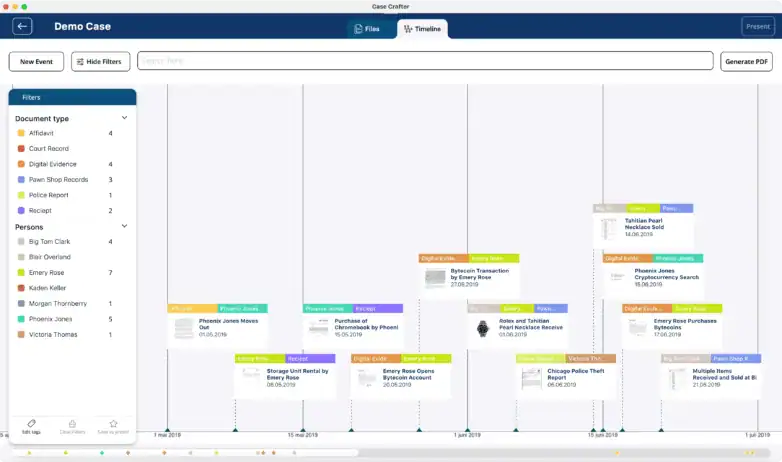
FULL EDIT TOOLS
Quickly identify key facts, exhibits, and witness testimony as you review case documents. Case Crafter’s trial preparation software is designed to keep you organized from discovery through verdict.
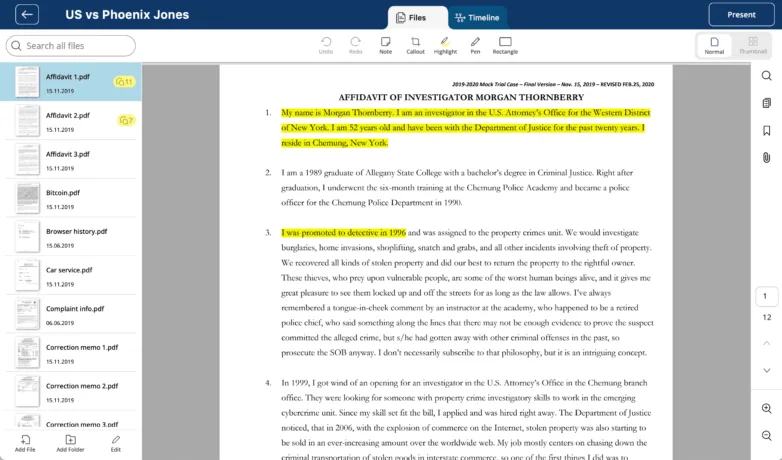
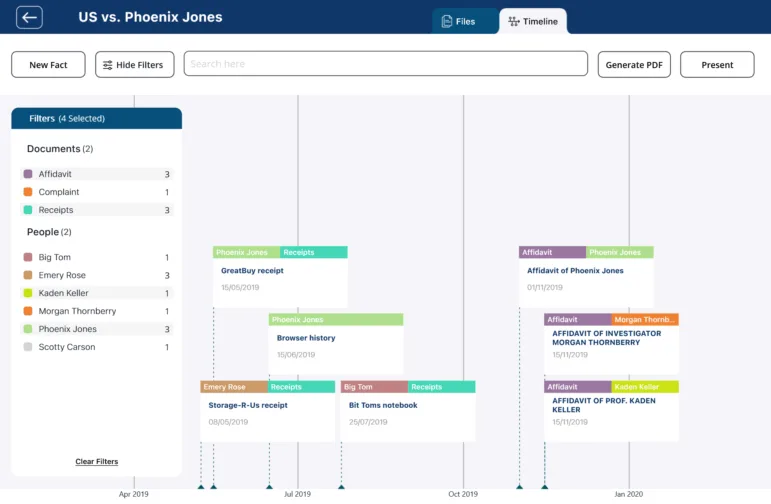
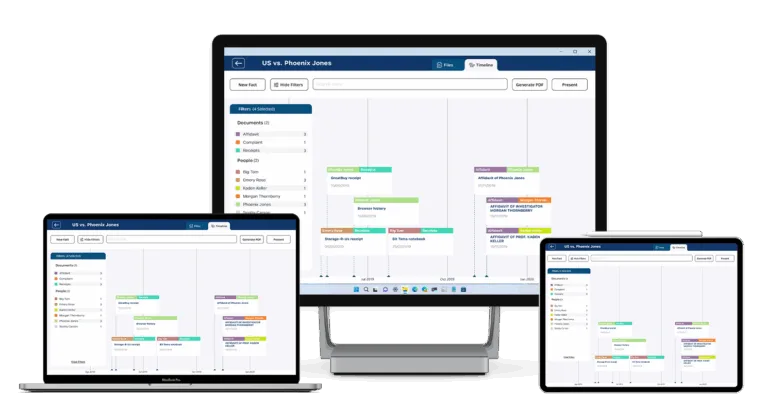
TIMELINE VIEW
Our interactive legal timeline software automatically creates a chronology of all identified case events. This gives you — and your audience — a clear and compelling story of the case from start to finish.
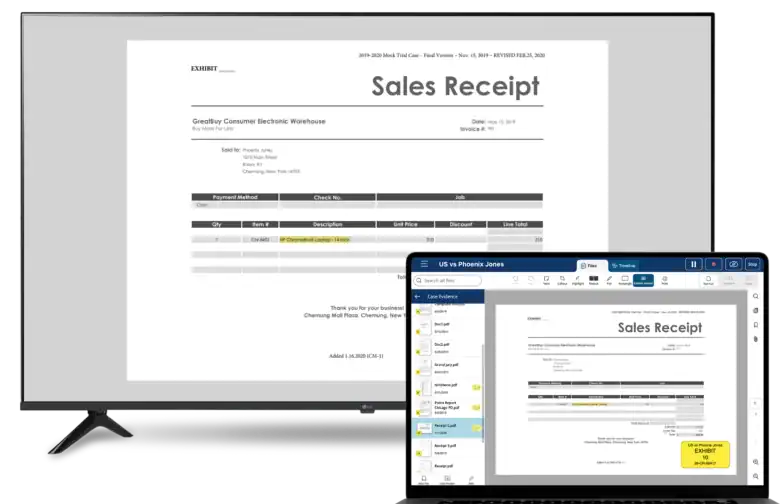
PRESENT MODE
Present mode shows the courtroom the evidence and nothing else. Your notes, your search, and your notifications stay on your screen. The jury sees a lawyer in command, not your desktop.
COMPARE VIEW · NEW IN 2.2
Don’t explain the contradiction. Show it. Side-by-side view puts two documents on one screen: the prior statement next to today’s testimony, the medical record next to the expert’s report. The jury sees the difference before you say a word.
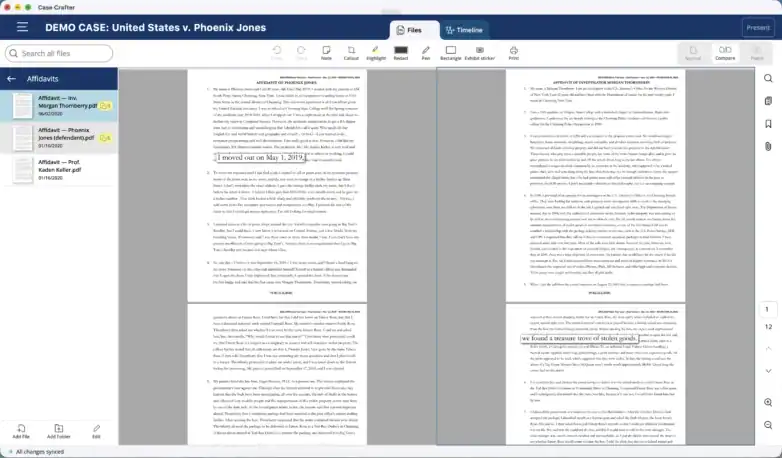
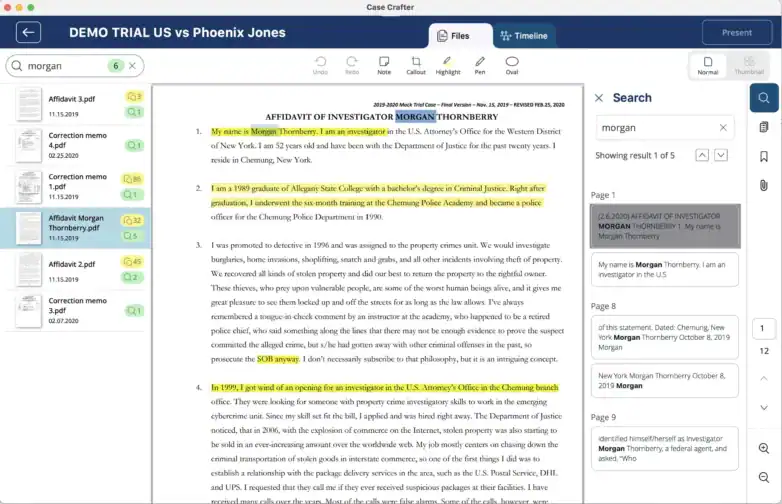
DOCUMENT SEARCH
Case Crafter comes with a built-in search engine. Every imported document is automatically OCRed at import, so you can search the whole case in an instant.
ALWAYS IN CHARGE
Keep a case on your device only, or sync it to the cloud to work across your PC, Mac and iPad and share it with your team, protected by multi-factor authentication. Either way, the files you present are on the device in your hand. Courthouse Wi-Fi is never part of the plan.

MULTIPLATFORM
With support for Windows, Mac, and iPad, you can easily build your case on your desktop PC and later walk the court room presenting evidence from your iPad.
7 day free trial. No credit card required


David Oddo
Partner/Principal at
Oddo & Babat, P.C.

Charles N. Rock
Owner at
Charles N. Rock PLLC

Steve Marchelos
Owner at
Marchelos Law P.C.

The built in document editor lets you add highlights, callouts, sticky notes, underlines, and more.
Open a deposition next to the trial transcript, or a record next to the expert’s report, in review and in presentation mode.
Label PDFs and photos with exhibit numbers in the app. The case number becomes the sticker footer automatically.

PDF documents are the most used document format for legal cases, but you can also import images, videos and audio files as part of your case.

Every imported document is automatically OCRed and indexed by our built-in search engine so you can find information fast across the whole case.

All the case facts are automatically added to our unique interactive timeline, making it easy to see the full picture for both you and the audience.

Each fact can be tagged with custom tags which makes it easier to group and filter them.

The whole case is stored on your device, so you don’t have to rely on unreliable guest wifi at the courthouse while presenting.

Case Crafter works on Windows, Mac and iPad, so you can use the best device for the task at hand.

Case Crafter automatically detects when you connect to a projector, so you can rest assured that your presentation will work every time.
Trial presentation software is used to display documents, images, video, and timelines in a clear and persuasive way during hearings or trials. It helps attorneys organize exhibits, build case chronologies, and present evidence seamlessly to the jury or judge.
Trial preparation software focuses on reviewing, tagging, and organizing case documents, while trial presentation software is designed to display those materials in court. Case Crafter combines both functions so you can prepare your case and present it effectively in one tool.
Yes. Chronology software transforms case facts into a visual narrative that resonates with jurors. By showing the story of a case through a timeline, attorneys can highlight key moments and reinforce arguments in a more persuasive way than with documents alone.
No. Case Crafter is compatible with standard laptops, desktops, and iPads. It automatically detects projectors and courtroom display systems, so you don’t need special equipment beyond your device.
Not at all. Case Crafter is designed to be intuitive, with drag-and-drop document management, automated chronology building, and simple presentation controls. Even attorneys with minimal tech experience can use it confidently.
Yes. Modern trial presentation software like Case Crafter supports video clips, audio files, and images in addition to traditional PDFs and text documents, ensuring every piece of evidence can be used effectively.
By centralizing document review, search, tagging, and chronology building in one platform, attorneys can cut hours from manual preparation. Instead of flipping through binders, they can instantly locate exhibits, build timelines, and prepare persuasive presentations.
Yes. You choose where each case lives. Local-only cases never leave your device. Cloud cases are encrypted in transit and at rest, protected by multi-factor authentication, and you decide who is invited. Presenting always uses the copy on your device, so nothing depends on a courtroom connection.
Yes. Since version 2.2 the compare view opens two files next to each other in the file view, inside a timeline event, and in presentation mode, so both appear on the courtroom screen at the same time.
Yes. Add an exhibit sticker to any PDF or image inside the app. The case number you set in the case properties becomes the default footer on every sticker.
Yes. A PDF without a text layer is recognized on your device when you import it, so scanned records show up in full-text search. Nothing is uploaded to be read.
Yes. Redact directly in the PDF before it goes on screen.
