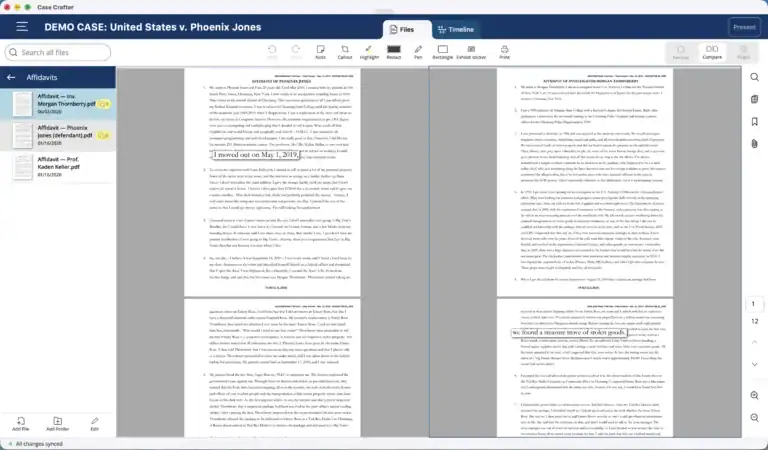
Updated for Case Crafter 2.2: the exhibit stickers and side-by-side view this article once listed as missing are now in Case Crafter.
If you are shopping for a TrialPad alternative, you are in the right place. TrialPad is one of the most established trial presentation tools, and for good reason. One thing worth knowing up front: TrialPad is not sold on its own. It is one of five apps in LIT Software’s LIT SUITE, alongside DocReviewPad, TimelinePad, TranscriptPad, and ExhibitsPad. So the fair comparison is not Case Crafter against a single app. It is Case Crafter against the whole suite.
Case Crafter takes a different shape. It is built around the case timeline, and you present your evidence directly from it. Document review, the timeline, and courtroom presentation all live in one case, on Windows, Mac, or iPad. Where the LIT SUITE is five specialized apps, Case Crafter is one.
This comparison is an honest one, and that means naming where each tool is ahead. TrialPad and the LIT SUITE are genuinely good. The question is which approach fits how you work.
Credit where it is due. The LIT SUITE is a mature, deep set of tools. TrialPad is a polished courtroom app with a deep presentation toolset, trusted in trials for years and run by the attorney rather than a technician. DocReviewPad handles document review and Bates stamping. TimelinePad builds case timelines. TranscriptPad works deposition transcripts, and ExhibitsPad creates juror exhibit binders. If you live in the Apple ecosystem and you want a specialized app for each job, it is a strong, proven choice.
In Case Crafter, the timeline is the center of the case. You tag facts as you review, the chronology builds itself, and in court you present your exhibits straight from the timeline. In the LIT SUITE the timeline lives in TimelinePad and the presentation lives in TrialPad. They are separate apps, so the place you build the story is not the place you tell it.
Case Crafter keeps review, the timeline, and presentation in one shared case. The LIT SUITE keeps a separate case in each app, and you move documents between them by export, for example from DocReviewPad into TrialPad. A linear review-then-present workflow can make that handoff feel natural. The cost shows up when the case is not linear: the export is a one-time copy, so a change you make after exporting does not flow back, and you end up maintaining the same case in more than one place. In Case Crafter there is one case and nothing to re-export.
The LIT SUITE runs on iPad and Mac only. LIT Software’s own guidance for Windows users is to keep files in cloud storage, such as OneDrive, Dropbox, or iCloud, and open them on an iPad. Case Crafter runs natively on Windows, Mac, and iPad from a shared codebase, so you can build your case on the Windows PC already on your desk and present from an iPad in court.
Case Crafter keeps a case synced across all your devices in real time, and you can share a case with other Case Crafter users so it stays current for everyone. This matters most for small firms, where co-counsel and staff need to work the same case without emailing copies back and forth. The LIT SUITE stores files locally and points cross-device users to cloud storage like iCloud, Dropbox, or OneDrive, with no real-time sync or live collaboration.
An honest comparison names the gaps too. When this article was first published, TrialPad had two things Case Crafter did not: exhibit stickers and a side-by-side view. Case Crafter 2.2 added both, so the remaining gap is Bates stamping. DocReviewPad stamps Bates numbers for document production; Case Crafter does not. If your practice leans on Bates stamping, the LIT SUITE has it and Case Crafter does not. For balance, Case Crafter does a few things the suite does not: the Acrobat-style continuous scroll in PDF view, text recognition for scanned PDFs that runs on your device so scanned discovery is searchable without uploading it anywhere, and a compare view that works inside the timeline and in presentation mode, not only in the document viewer. The suite’s courtroom toolset is still deep and worth respecting.
On the things that are shared: both tools present without an internet connection from files on your device, both offer a 7-day free trial, and both are designed to be operated by the attorney. Case Crafter additionally lets you keep a case local-only or sync it to the cloud and share it with your team. Document search is even too, both index the full text of your files. Search does differ in one place, though, and it follows from the timeline-first design: Case Crafter searches the full text of everything on the timeline, while TimelinePad searches only event titles, not the documents behind them. The other real differences are the single shared case, the platform, and real-time sync.
| Feature | Case Crafter | LIT SUITE (TrialPad + 4 apps) |
|---|---|---|
| Built around the timeline, present from it | ✓ Yes | No, timeline and presentation are separate apps |
| One shared case across review and trial | ✓ Yes, one case | No, a separate case per app, joined by export |
| Platforms | Windows, Mac, iPad | iPad and Mac only |
| Real-time sync and sharing | ✓ Yes | No (local files; cloud-storage workaround) |
| Continuous scroll in PDF view | ✓ Yes | No |
| Search document text | ✓ Yes | ✓ Yes |
| Full-text search within the timeline | ✓ Yes | No, event titles only (TimelinePad) |
| Bates stamping | No | ✓ Yes (DocReviewPad) |
| Exhibit stickers | ✓ Yes (2.2), case number as default footer | ✓ Yes (TrialPad) |
| Side-by-side document view | ✓ Yes (2.2), in review, in the timeline and in presentation | ✓ Yes (TrialPad) |
| Works offline | ✓ Yes | ✓ Yes |
| Free trial | 7 days, no credit card | 7 days |
| Pricing | $599/year, or pay monthly | $600/year, billed annually only (all 5 apps) |
If you and your firm are all-Apple, you want a specialized app for each task, or you rely on Bates stamping, the LIT SUITE is a strong, proven choice. If you work on Windows, you want one case built around the timeline that carries you from review to the courtroom, or you collaborate with co-counsel or experts and need the case to stay in sync for everyone, Case Crafter is built for exactly that. Both will get a prepared attorney through trial. The question is which fits the computer on your desk and the way you like to work.
Yes. Case Crafter is built for the same job as TrialPad, presenting evidence in court, but it is one app instead of five, it runs on Windows as well as Mac and iPad, and it is built around the case timeline. For many solo attorneys and small firms, that makes it a simpler TrialPad alternative.
Yes. Case Crafter runs natively on Windows, Mac, and iPad. TrialPad and the rest of the LIT SUITE run on iPad and Mac only.
Yes. In Case Crafter the timeline is the center of the case, and you present your exhibits straight from it. In the LIT SUITE the timeline (TimelinePad) and presentation (TrialPad) are separate apps.
No. Each app keeps its own case. To move documents from review to presentation you export them from one app and import them into another. Case Crafter keeps everything in one shared case.
Bates stamping. Exhibit stickers and a side-by-side document view were added in Case Crafter 2.2. If your practice relies on Bates stamping for document production, the suite has it today and Case Crafter does not yet.
Yes. Both Case Crafter and the LIT SUITE search the full text of your documents. The difference is in the timeline: Case Crafter searches the full text of everything on the timeline, while TimelinePad searches only event titles.
Yes. With Case Crafter, cases sync across your devices in real time, and you can share a case with other Case Crafter users so it stays up to date for everyone.
Yes. Case Crafter offers a 7-day free trial with no credit card required.
Yes. Since version 2.2 you can open two files next to each other in the file view, inside a timeline event, and in presentation mode. Exhibit stickers were added in the same release. See What’s new in Case Crafter 2.2.
Ready to see it for yourself? Start your free trial, or book a demo and we will walk you through your first case.